


Essential Guide to Maintaining Your Solar Battery for Optimal Performance
A home solar battery can make a solar system feel far more useful and resilient. It stores extra energy for later, helps reduce dependence on the grid, and can provide backup power during outages. For many homeowners, it also represents a meaningful step toward a lower impact home that is both practical and future ready. The good news is that maintaining a solar battery usually does not involve complicated technical work. In most cases, it comes down to a set of simple, repeatable habits that fit naturally into everyday home care.
Table Of Content
- Why solar battery maintenance matters
- What maintenance usually looks like for homeowners
- Your monthly solar battery maintenance routine
- Keep the battery and surrounding area clean
- Check for warning signs without opening the system
- Why temperature management is so important
- Practical ways to support a healthy battery temperature
- Use your app as a maintenance tool, not just a dashboard
- What to look for in your monitoring system
- State of charge, storage habits, and battery longevity
- When long term storage guidance matters
- Seasonal maintenance for better year round performance
- Common problems homeowners can spot early
- What not to do
- When to call a professional
- Safety standards, codes, and why they matter for maintenance
- Building a simple maintenance checklist you will actually use
- The bigger picture: maintenance as part of a resilient home
That simplicity can be easy to misunderstand. Because many modern battery systems are highly automated, people sometimes assume they require no attention at all. In reality, a well maintained battery system performs better, lasts longer, and is less likely to surprise you with preventable issues. Routine care also supports safety, warranty protection, and peace of mind, especially if you rely on your system for backup power during storms or grid disruptions.
This guide focuses on practical solar battery maintenance tasks that homeowners can integrate into monthly and seasonal routines. You do not need to become an electrician to care for your battery well. What you do need is a basic understanding of how your system behaves, what conditions support battery health, and when to call a professional instead of trying to fix something yourself. With a calm and consistent approach, solar battery maintenance becomes one more manageable part of running a smart home.
As manufacturers and energy agencies increasingly emphasize, the best maintenance strategy is usually preventive rather than reactive. The National Renewable Energy Laboratory has highlighted best practices for photovoltaic and energy storage systems because good operation and maintenance improve safety, reliability, and long term performance. In other words, the everyday choices you make around cleanliness, airflow, temperature, storage levels, and monitoring can have a measurable effect on how well your battery serves your household over time.
Why solar battery maintenance matters
Solar batteries are designed to be durable, but they are still sensitive devices. Most residential systems use lithium ion chemistry, which performs best within a recommended operating environment. Extreme heat, prolonged full charge, deep depletion, poor ventilation, and ignored warning signs can all reduce efficiency or shorten battery life. Even if your battery continues to function, gradual performance decline may mean less stored energy, weaker backup readiness, or reduced financial value from your solar investment.
Maintenance also matters because a battery never works in isolation. It is part of a larger solar energy system that includes panels, inverters, software, wiring, and often a backup configuration. If one part of the system is not operating properly, the battery may not charge or discharge as expected. The U.S. Department of Energy notes that a year over year production drop greater than 10 percent can indicate maintenance problems. That kind of trend can affect battery behavior as much as battery health itself.
There is also a safety dimension. Homeowners do not need to open the battery casing or handle internal components, but they should know how to notice external warning signs. Damaged, dented, swollen, overheating, or otherwise compromised lithium ion batteries should not be used. Health Canada advises against using damaged batteries and emphasizes proper storage and handling practices. For residential storage systems, that translates into regular visual awareness and prompt professional service if something seems unusual.
Finally, battery maintenance protects resilience. More homeowners are pairing solar with storage because they want dependable backup during outages. That benefit only works if the system is available and ready when needed. A battery that is obstructed, running too hot, not charging correctly, or sitting with unresolved alerts may not perform as expected during an emergency. Routine maintenance is not just about preserving equipment. It is about preserving household readiness.
What maintenance usually looks like for homeowners
One of the most reassuring facts for homeowners is that routine battery maintenance is often quite minimal. Tesla, for example, states that Powerwall owners generally do not need scheduled preventive maintenance and that the owner’s main physical task may simply be keeping the unit clear of debris, especially around intake and exhaust areas. That is a useful model for understanding modern battery care more broadly. The daily and monthly work is less about mechanical tinkering and more about preserving the right operating environment.
In practice, that means paying attention to four things consistently. The first is cleanliness, especially around vents or airflow paths. The second is temperature, because batteries are affected by heat and cold more than many people realize. The third is monitoring, usually through an app or online portal that shows charge state, warnings, and energy activity. The fourth is context, meaning how the battery is performing as part of the wider solar system and your home’s backup strategy.
It can help to think of battery maintenance the same way you think about maintaining a high efficiency heating system. Most of the time, nothing dramatic is happening. But a small amount of regular attention keeps everything running smoothly and helps you catch problems while they are still minor. A quick monthly review often matters more than a once a year scramble after a problem appears.
Your monthly solar battery maintenance routine
A simple monthly routine can take less than 10 minutes, but it creates a strong foundation for battery performance. By checking the same few items regularly, you build familiarity with what normal looks like. That makes it much easier to notice unusual behavior early. The goal is not to inspect every wire or decode technical diagnostics. The goal is to confirm that your battery is clean, unobstructed, and behaving normally.
Here is a practical monthly routine that works well for most homeowners:
- Open your monitoring app or portal and review battery charge patterns, recent alerts, backup status, and general system activity.
- Do a visual check of the battery exterior and surrounding area without opening or touching internal components.
- Clear dust, leaves, cobwebs, or stored items away from vents, intake, exhaust, and access areas.
- Confirm the space remains dry, tidy, and well ventilated according to manufacturer guidance.
- Notice any changes in household performance, such as shorter backup duration, slower charging, or unusual app notifications.
This routine matters because consistency creates a performance baseline. If your app usually shows predictable charging during sunny days and a healthy reserve for backup, any shift becomes easier to spot. If the space around the battery usually remains clean and cool, clutter or dust buildup stands out sooner. Maintenance becomes much less overwhelming when it is folded into a familiar rhythm rather than treated as a major annual project.
Keep the battery and surrounding area clean
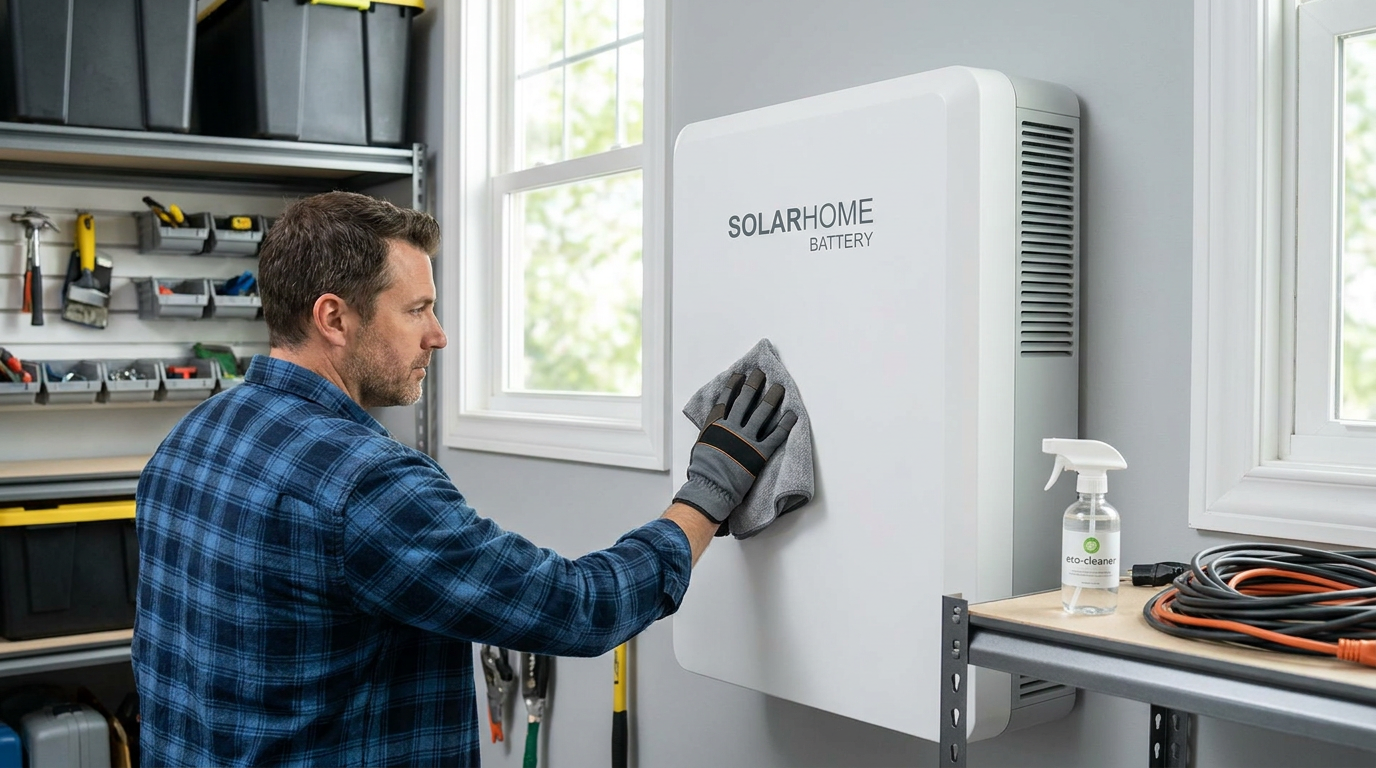
Cleanliness is one of the simplest and most important maintenance tasks. Debris around a battery can restrict airflow, contribute to overheating, or make it harder to notice signs of moisture or damage. Dust, pet hair, cobwebs, leaves, and nearby stored materials can all gradually affect the installation environment. If your battery is in a garage, utility room, or outdoor side yard, it is worth checking whether household items have slowly crept into the recommended clearance area.
Use a dry cloth or a soft cloth slightly dampened as allowed by the manufacturer, and avoid harsh chemicals, solvents, or abrasive tools. Tesla specifically advises keeping the unit free of debris and avoiding solvents or harsh chemical cleaning products. This is a good principle for most battery systems. The battery enclosure should remain intact and should not be scrubbed aggressively or sprayed directly with cleaning liquids unless the manufacturer explicitly permits that method.
It is also worth keeping the broader area organized. Paint cans, cardboard boxes, sports gear, garden supplies, and other stored items can reduce ventilation or make access harder for inspection and servicing. A clean and calm utility space supports both safety and longevity. It also makes the system feel like a purposeful part of the home rather than an afterthought tucked behind clutter.
Check for warning signs without opening the system
Visual awareness matters, but homeowners should stay within safe limits. You do not need to remove covers, inspect wiring, or test electrical components. Instead, pay attention to the battery’s exterior condition and overall surroundings. Look for dents, swelling, scorch marks, corrosion, moisture, unusual odors, or anything that appears different from the normal condition of the unit.
If you notice damage or anything concerning, stop there and contact your installer or the manufacturer’s support team. Health Canada warns against using damaged lithium ion batteries, and that caution is especially important with large residential storage systems. A damaged enclosure or unexplained odor is not a DIY problem. It is a reason to isolate the issue, keep clear, and get qualified help quickly.
Some battery systems also include visible status lights or external indicators. If yours does, take a moment to learn what normal signals look like and what warning patterns mean. You do not need to memorize every code, but recognizing the difference between normal operation and a service alert can save time and stress later.
Why temperature management is so important
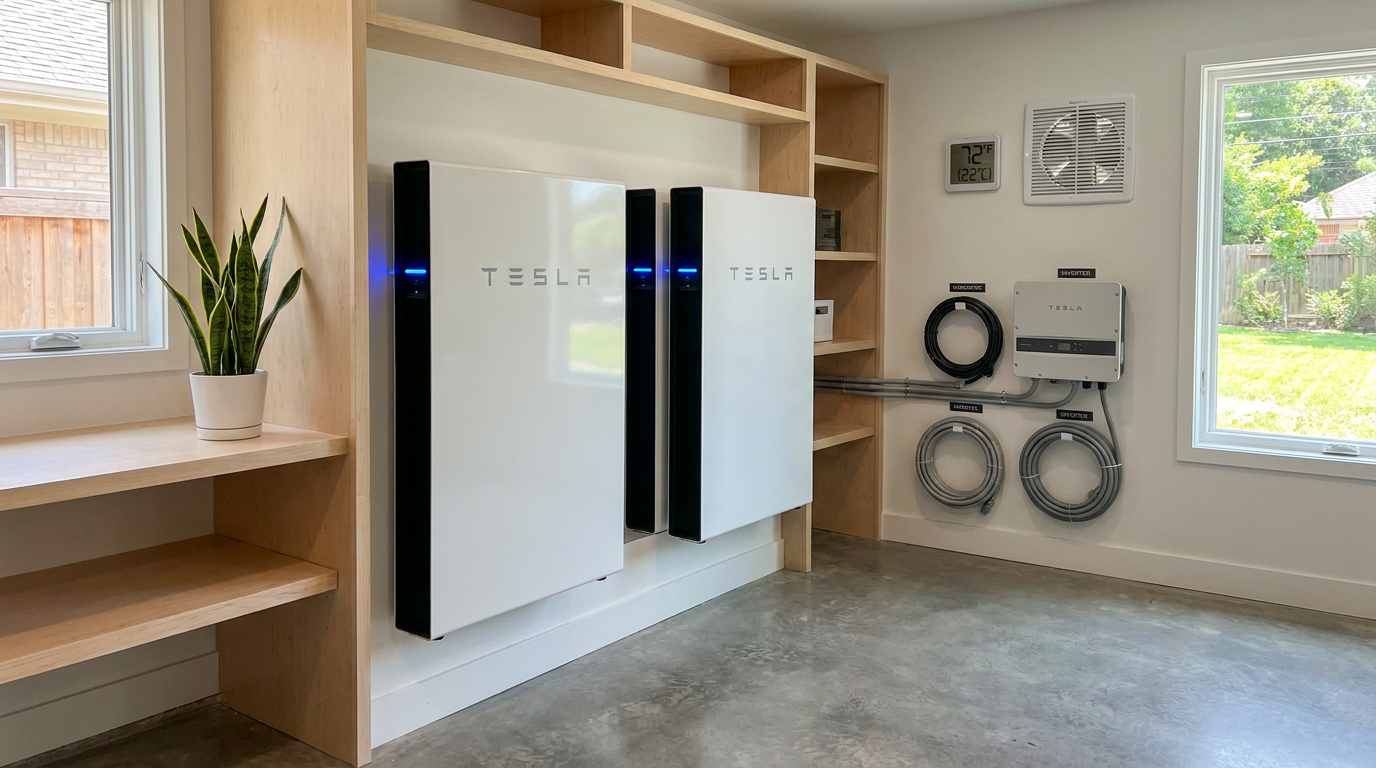
Temperature is one of the most significant factors affecting solar battery performance and lifespan. Lithium ion batteries can operate across a broad range, but they do not perform equally well in every condition. Tesla’s published guidance for Powerwall identifies an optimal ambient temperature range of 0 degrees Celsius to 30 degrees Celsius, while also noting that performance can be reduced at temperature extremes. This is a useful reminder that even advanced systems are still influenced by their environment.
Heat is especially important to take seriously. High temperatures can accelerate battery degradation over time, reducing capacity and efficiency. In very hot spaces, a battery may also need to work harder to manage internal conditions, which can affect performance. If your battery is outdoors or in a garage that gets very warm, check whether the location receives direct sun during the hottest parts of the day and whether airflow remains unobstructed.
Cold weather has its own effects. Batteries can still function in low temperatures, but charging and discharge performance may be reduced. In colder climates, indoor installation is often recommended when possible, though local code requirements and installation restrictions must always be followed. Natural Resources Canada notes that battery placement, maintenance, and installation location should be discussed with the supplier, and that code requirements may limit placement inside dwellings. This is one reason installation quality matters so much from the beginning.
Practical ways to support a healthy battery temperature
Most homeowners cannot and should not attempt to alter the battery’s internal thermal management systems. What you can do is help maintain a supportive ambient environment. That starts with preserving clear airflow around the battery and not blocking vents or intake areas with storage items. It also means avoiding unnecessary heat buildup from nearby appliances, direct sunlight, or sealed, unventilated spaces.
During summer, it is worth paying attention to how hot the battery’s room or wall area becomes in the afternoon. During winter, notice whether the battery is exposed to severe cold drafts or snow accumulation if installed outside. You may not need to take action if the system is designed for those conditions, but awareness helps you notice if performance changes seasonally. If your monitoring app regularly reports thermal warnings, reduced charging, or unusual behavior during temperature extremes, contact your installer for guidance.
In a broader sense, temperature management is a reminder that battery maintenance starts with placement. If you are still in the buying or installation phase, ask direct questions about climate suitability, clearance requirements, and code compliant installation locations. Maintenance becomes much easier when the battery is installed thoughtfully in the first place.
Use your app as a maintenance tool, not just a dashboard
Modern home battery systems usually come with an app or monitoring portal, and this may be the most useful maintenance tool you have. Yet many homeowners only open it when the power goes out or when they want to admire a sunny day’s production. A better approach is to treat the app as part of your monthly home routine. It gives you insight into battery charge behavior, solar production, backup readiness, and warning notifications long before a problem becomes obvious.
Review the app for patterns rather than isolated numbers. Ask yourself whether the battery is charging and discharging in the way you expect. Is it reaching normal reserve levels? Is it supporting your household during peak periods the way it usually does? Have there been any repeated warnings, communication errors, or unusual drops in available capacity? Small changes over time are often more meaningful than one odd day caused by weather or household demand.
The Department of Energy advises that a drop in solar production greater than 10 percent year over year can point to maintenance issues. That production trend may signal dirty or shaded panels, inverter problems, or system faults that indirectly affect battery performance. If the battery seems underused, the issue may not be the battery itself. It may be that the solar array is producing less energy to store. Good maintenance means watching the whole system, not only the storage unit.

What to look for in your monitoring system
If you are not sure what to review each month, focus on a few practical categories. Start with state of charge, which tells you how full the battery is at a given time. Then look at charging and discharging trends across a week or month. Check whether backup reserve settings still reflect your priorities, especially during storm season or periods of grid instability. Finally, look for any active alerts, connectivity issues, or reduced performance notes.
You do not need to become an expert in depth of discharge or cycle life overnight, but understanding the basics is useful. State of charge refers to how full the battery is, while depth of discharge refers to how much of its capacity has been used. Manufacturers build systems to manage these ranges intelligently, but your settings and usage patterns still matter. If your app includes explanations or AI generated summaries, use them as a starting point, but do not ignore official documentation when making decisions.
Keeping a simple record can also help. A short monthly note with backup settings, production trends, and any alerts can make conversations with support teams much easier if something changes later. It is a low effort habit that adds clarity and confidence.
State of charge, storage habits, and battery longevity
One common misconception is that batteries should always be kept fully charged to stay healthy. For lithium ion systems, that is not always true. Health Canada advises storing lithium ion batteries at room temperature and, for larger battery systems in long term storage, checking them every three months and recharging them back to about 50 percent if needed. Tesla’s emergency guidance similarly notes that storage is ideally at 50 percent state of charge or less, and that long term storage at full charge or complete depletion can reduce battery life.
This matters most when a battery system will be turned off or left unused for an extended period. That could happen during a renovation, a seasonal property closure, or a long vacancy. In normal daily operation, your battery management system usually handles charging behavior automatically. But if your installer or manufacturer provides long term shutdown or storage instructions, follow them closely rather than assuming a full battery is best.
For everyday homeowners, the practical takeaway is simple. Avoid habits or settings that keep the battery sitting at extremes unnecessarily for long periods unless the manufacturer specifically designs the system for that use case. Backup reserve settings should reflect resilience needs, but they should also align with manufacturer recommendations and your actual usage patterns. If you are unsure, your installer can help balance battery availability with long term health.
When long term storage guidance matters
Long term storage guidance is especially relevant for second homes, cabins, and properties with seasonal occupancy. If the system will be inactive, ask your installer exactly how the battery should be left, what charge level is recommended, and whether periodic checks are needed. Health Canada’s guidance to check larger systems every three months offers a useful benchmark when a battery is stored or idle for an extended time. That does not mean improvising your own service procedure. It means confirming the manufacturer approved process and sticking to it.
This is also a good moment to review documentation. Keep your owner’s manual, installer contact information, warranty documents, and emergency guidance in one accessible place. Calm preparation is part of maintenance. When information is easy to find, decisions become easier and safer.
Seasonal maintenance for better year round performance
Solar battery maintenance works best when it follows the rhythm of the seasons. Monthly checks are useful, but seasonal shifts often introduce the conditions most likely to affect battery performance. Heat waves, cold snaps, wildfire smoke, heavy storms, snow buildup, and longer outage risk periods all change how your system operates. A few seasonal adjustments can help keep your battery ready and efficient.
In spring, review your app after winter and look for any unusual production or charging patterns. If your solar panels were affected by snow, debris, or shade over winter, you may notice the battery charging differently as the season changes. Spring is also a good time to tidy the battery area thoroughly and make sure vents or access paths have not become cluttered.
In summer, focus on heat. Check whether the battery is exposed to direct sun or trapped hot air. If the unit is outdoors, observe whether nearby landscaping has grown in ways that restrict airflow. If the battery is in a garage, consider whether the room regularly exceeds comfortable ambient conditions. Monitoring during hot spells is often more useful than making assumptions based on average temperatures.
In fall, prepare for outage season if your area experiences storms. Confirm backup settings, test outage readiness if your manufacturer provides a safe procedure, and make sure the monitoring app is working properly on all household devices that may need it. In winter, keep outdoor installations accessible and free from obstructive snow or debris while following manufacturer guidance. Never chip at the unit or force frozen components. If the system appears affected by severe weather, call a professional.
Common problems homeowners can spot early
The most helpful maintenance habit is learning to recognize the difference between normal variation and early signs of a problem. Cloudy weather, higher household energy use, or seasonal temperature changes can all affect what you see in the app. But repeated warnings or persistent underperformance deserve attention. The sooner you notice them, the easier the next step usually is.
Some of the most common issues homeowners can catch early include reduced battery charging despite sunny conditions, repeated app alerts, visible debris obstructing airflow, unusual noise from fans or related equipment, moisture near the installation area, and a mismatch between expected backup performance and actual results during outages. These issues do not always mean the battery itself is failing. Often they point to broader system conditions that need servicing.
If your solar production has dropped significantly from the same period last year, treat that as a signal to investigate. As DOE guidance suggests, a drop greater than 10 percent year over year can indicate maintenance problems. Shading, dirty panels, inverter issues, communication faults, or configuration changes can all ripple through to battery behavior. A calm and methodical review is usually more effective than assuming the battery is the problem.
Good battery maintenance is rarely dramatic. It is the quiet habit of noticing small changes before they become expensive ones.
What not to do
Just as important as knowing what to do is knowing what not to do. Home battery systems combine high value equipment with significant electrical energy, so caution matters. Do not open the battery casing, disconnect components, bypass alerts, or attempt internal repairs yourself. Even well intended troubleshooting can create safety risks or affect warranty coverage.
Do not use harsh cleaners, pressure washing, flammable products, or abrasive materials on the enclosure unless the manufacturer explicitly allows them. Do not stack storage items against the battery or cover vents to make the space look neater. A battery needs room to breathe, and airflow is part of system care. Also avoid ignoring recurring software alerts simply because the lights still turn on. Monitoring warnings often appear before visible failures do.
Another important caution involves replacement parts and accessories. Transport Canada warns that some third party lithium ion batteries may have no obvious visual defects even when they are substandard. For homeowners, that supports a simple rule. Use original equipment manufacturer parts or certified compatible replacements approved by the manufacturer or installer. A cheaper substitute can create much larger costs if it compromises safety, certification, or system reliability.
When to call a professional
Homeowners can do a great deal through observation, cleaning, and monitoring, but some situations clearly call for professional service. Contact your installer, manufacturer, or a qualified technician if you see physical damage, smell burning or chemical odors, notice moisture intrusion, receive persistent fault alerts, or experience unexplained drops in system performance. The same applies if the battery does not support loads during an outage the way it is supposed to.
It is also wise to call a professional if you are unsure whether a condition is normal. Battery systems are too valuable to ignore and too specialized to guess at. A brief service call may confirm that everything is fine, or it may identify a small issue before it becomes a larger one. In either case, expert guidance supports both safety and long term value.
If you are planning electrical upgrades, adding major loads, remodeling the installation area, or changing how you use backup power, involve your installer early. Battery settings and system design are connected to household energy patterns. Maintenance is not only about keeping the current setup clean. It is also about making sure the system still fits the home it serves.
Safety standards, codes, and why they matter for maintenance
It can be tempting to think of standards and certifications as concerns only for installers, but they matter to homeowners too. Energy storage systems increasingly rely on safety and installation frameworks such as UL 9540, UL 1973, and UL 9540A related testing. These standards help establish how systems are evaluated for safety, integration, and installation conditions. While you do not need to master the technical details, it is worth knowing whether your system and installer followed recognized standards.
Code compliance also affects maintenance decisions. Installation location, wall clearances, ventilation conditions, and access requirements are not arbitrary. They are part of creating a safe operating environment. If you remodel a garage, enclose a utility space, or store new materials near the battery, you could unintentionally change that environment. When in doubt, ask before making changes.
This is especially important in Canada and the United States, where local codes and utility requirements can vary. Natural Resources Canada notes that battery choice, warranties, maintenance, and installation location should be discussed with the supplier, and that electrical code changes may restrict battery placement inside dwellings. A well maintained battery starts with a code compliant installation and stays healthy when that installation context is respected over time.
Building a simple maintenance checklist you will actually use
The best maintenance routine is the one you can sustain. That usually means keeping it short, clear, and realistic. You do not need a complex spreadsheet unless you enjoy that kind of tracking. A simple checklist on your phone, in a home maintenance app, or near the electrical panel can be enough to support consistent care. When maintenance feels practical, it becomes much easier to stick with.
A homeowner friendly checklist might include the following monthly and seasonal items:
- Open the battery app and review charge patterns, alerts, and backup settings.
- Check the exterior of the battery for visible damage, moisture, or unusual conditions.
- Clear dust and debris from around vents, intake, exhaust, and access areas.
- Confirm the space remains uncluttered, dry, and appropriately ventilated.
- Compare current performance with recent months and the same season last year.
- Before storm season, confirm outage readiness and reserve settings.
- During heat or cold extremes, check for thermal related alerts or reduced performance.
- Keep manuals, warranty information, and installer contacts easy to access.
Notice how little of this is technical. Most of it is simply paying attention, keeping the area clean, and using information already available to you. That is encouraging because it makes sustainable home performance more approachable. Caring for a battery does not require constant effort. It requires a steady, informed rhythm.
The bigger picture: maintenance as part of a resilient home
Solar battery maintenance is not just about preventing failure. It is part of building a home that performs well over time with less waste, fewer surprises, and more control. When homeowners understand their systems and care for them consistently, clean technology becomes more dependable and less intimidating. That is an important shift because sustainability works best when it feels integrated into ordinary life rather than layered on as a burden.
There is also a wider trend supporting this approach. Solar plus storage adoption is growing because people want resilience, energy awareness, and better use of the electricity they generate. At the same time, monitoring tools, remote diagnostics, and safety standards are improving. Maintenance is increasingly about informed oversight rather than complicated hands on intervention. For homeowners, that is a very practical kind of progress.
If you already have a battery system, think of maintenance as a small monthly investment in performance, safety, and peace of mind. If you are considering adding storage, ask maintenance questions during the buying process and choose a system whose monitoring tools and support resources feel accessible to you. The easiest sustainable technology to live with is the one that fits smoothly into your routines.
In the end, optimal solar battery performance usually comes from simple habits done consistently. Keep the battery area clean and unobstructed. Respect temperature conditions. Watch your app for patterns and alerts. Follow manufacturer guidance for storage and settings. Call a professional when something seems off. These steps may be modest, but together they help protect one of the most useful energy assets in a modern home.



No Comment! Be the first one.